Chapter 12: Digital drawing and illustration tools
Every digital drawing program makes one of two kinds of image. A painting app stores colored dots; an illustration app stores shapes. The two kinds behave differently when you enlarge them, edit them or send them to a printer, and choosing the wrong one at the start can mean redrawing the work later.
Raster and vector
A raster image, or bitmap, is an image stored as a grid of pixels, each with its own color.1 A pixel is one cell in that grid. Photographs, scans and digital paintings are raster; Photoshop, Procreate, Krita and Clip Studio Paint are raster tools at heart.
A vector graphic is an image stored as descriptions of shapes: a path made of points, lines and curves, plus its fill and stroke. The W3C defines SVG, the web’s vector format, as “a language for describing two-dimensional graphics”, whose objects are shapes, images and text.2 Illustrator, Inkscape, Affinity Designer and Figma are vector tools.
A raster image has a fixed number of pixels, so enlarging it makes each pixel bigger, or makes the software invent new ones, and edges go soft or stepped. A vector graphic is recalculated at the new size, so a logo drawn as vectors prints as cleanly on a bus shelter as on a business card.
Vectors are poor at photographs, painted texture and anything with continuous, irregular tone. Raster is poor at logos, icons, type and diagrams that must stay sharp at many sizes. Screens and printers are both made of dots, so every vector is eventually turned into pixels, or rasterized, at the size it’s shown3 (→ 35 Resolution, formats and units).
Bézier curves and the pen tool
A Bézier curve is a curve defined by two end points and one or two control points that pull it toward them without touching it. In drawing software the end points are anchor points, which the path passes through. The control points appear as handles sticking out from the anchors; the direction of a handle sets the curve’s direction as it leaves the anchor, and its length sets how far the curve bulges.
A cubic Bézier segment has two control points, one for each end; a quadratic Bézier has one, shared by both ends.4 Font formats split: TrueType outlines use quadratic curves, while the CFF outlines in many OpenType fonts use cubic ones35 (→ 17 Anatomy and classification of type).
The mathematics came from car bodies. Paul de Casteljau, who joined Citroën in 1958, worked out a method for constructing these curves and registered it in a sealed, dated “Enveloppe Soleau” with the French patent office in 1959. Citroën didn’t publish it; a figure of the method appeared only in a 1971 article about the company’s computer-aided design work.6 Pierre Bézier, an engineer at Renault, reached equivalent curves independently, then patented and popularized them, and his name stuck.7
The pen tool builds a path by placing anchor points and dragging out handles. Adobe Illustrator, released for the Macintosh in 1987, began as a version of Adobe’s in-house font tool.8 In Illustrator and most programs since, a click places a corner point, where the path changes direction sharply. A click and drag places a smooth point, whose two handles stay in a straight line, so the curve passes through without a kink.
In practice:
- Use as few anchor points as the shape allows. Extra points make curves lumpy and hard to edit.
- Put anchors at the extremes of a curve, where it is furthest up, down, left or right, and keep the handles there horizontal or vertical.
Layers and masks
A layer is one sheet in a stack of separate images or objects that together make up a picture. Each can be moved, hidden, faded or edited without touching the others. Photoshop 3.0 introduced layers in 1994,9 and almost every drawing program now has them.
A layer mask is a grayscale image attached to a layer that controls what shows. Painting black on the mask hides that part of the layer, white reveals it, and gray makes it partly transparent.10 Nothing is erased, so a hidden area can be brought back later. Working this way, so the original can always be recovered, is non-destructive editing (→ 34 Image editing).
A clipping mask limits a layer to the shape of the layer below it. A texture on a layer clipped to a character’s silhouette appears only inside it.10
Tablets and styluses
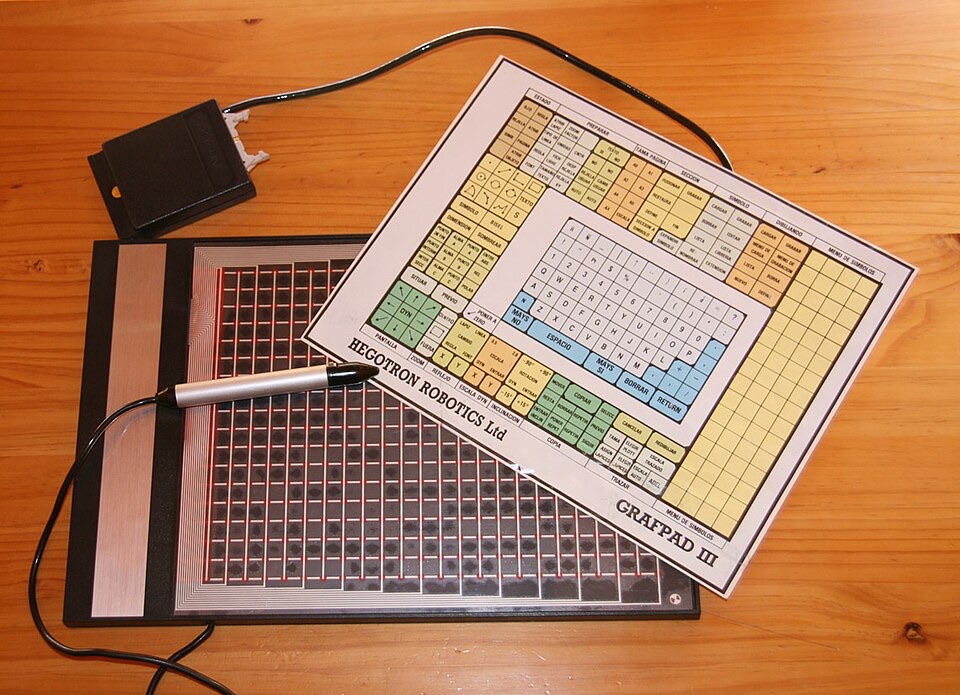
A pen tablet is a flat surface used with a stylus, while the drawing appears on a separate screen. A pen display is a screen that senses the stylus, so the artist draws directly on the image. Tablets such as the iPad with Apple Pencil are a third kind.
RAND Corporation’s 1964 memorandum describes the RAND Tablet, a 10 × 10 inch surface that could tell apart a million positions, and calls it “believed to be the first such graphic device that is digital”.12 Wacom, a Japanese company founded in 1983, launched its cordless WT series in 1984 and added pressure sensitivity with the SD series in 1987.13 Its Cintiq pen displays arrived in 2001.13 When Apple introduced the Pencil in 2015, it measured pressure and tilt.14
Pressure makes a stylus a drawing tool. The software maps it, usually to line width or opacity, so a stroke can taper like ink from a brush. Tilt lets a stylus shade with its side, as a pencil does (→ 11 Drawing, perspective and composition). The Japanese company CELSYS released Clip Studio Paint, for illustration and manga, in 2012; by 2021 it had 10 million users worldwide.15
488405 Sespo (assumed), CC BY-SA 4.0, via Wikimedia Commons.
See also
- 11 Drawing, perspective and composition
- 17 Anatomy and classification of type
- 27 Illustration, icons and symbols
- 34 Image editing
- 35 Resolution, formats and units
- 45 Human-computer interaction: history and theory
Sources
- Adobe (2025). “Celebrating 35 years of creativity, community, and innovation with Adobe Photoshop.” Adobe Blog, February 19.
- ACM SIGGRAPH History Archives. “Pierre Bézier.”
- Apple (2015). “Apple Introduces iPad Pro Featuring Epic 12.9-inch Retina Display.” Press release, September 9.
- CELSYS. “History.” Company website.
- Computer History Museum. “Adobe Illustrator, first version.” Revolution: The First 2000 Years of Computing.
- Davis, M. R., and Ellis, T. O. (1964). The RAND Tablet: A Man-Machine Graphical Communication Device. RM-4122-ARPA. RAND Corporation.
- MDN Web Docs. “Raster image” (glossary) and “Paths” (SVG tutorial). Mozilla.
- Microsoft. OpenType Specification 1.9.1: “TrueType fundamentals” and “CFF2.”
- Müller, A. (2024). “Paul de Casteljau: The story of my adventure.” Computer Aided Geometric Design 110, 102278.
- Procreate. “Mask.” Procreate Handbook.
- W3C. CSS Masking Module Level 1, introduction.
- W3C (2018). Scalable Vector Graphics (SVG) 2, chapter 1.
- Wacom (2023). “Wacom celebrates its 40th anniversary.”
Notes
- MDN Web Docs, “Raster image.” https://developer.mozilla.org/en-US/docs/Glossary/Raster_image ↩
- W3C, SVG 2, §1.1. https://www.w3.org/TR/SVG2/intro.html ↩
- Microsoft, “TrueType fundamentals,” OpenType Specification 1.9.1. https://learn.microsoft.com/en-us/typography/opentype/spec/ttch01 ↩ ↩
- MDN Web Docs, “Paths.” https://developer.mozilla.org/en-US/docs/Web/SVG/Tutorials/SVG_from_scratch/Paths ↩
- Microsoft, “CFF2,” OpenType Specification 1.9.1. https://learn.microsoft.com/en-us/typography/opentype/spec/cff2 ↩
- Müller (2024), introduction, autobiography text and notes 50, 68 and 75. https://doi.org/10.1016/j.cagd.2024.102278 ↩
- ACM SIGGRAPH History Archives, “Pierre Bézier.” https://history.siggraph.org/person/pierre-bezier ↩
- Computer History Museum, “Adobe Illustrator, first version.” https://www.computerhistory.org/revolution/personal-computers/17/306/1233 ↩
- Adobe Blog (2025). https://blog.adobe.com/en/publish/2025/02/19/celebrating-35-years-of-creativity-community-innovation-with-adobe-photoshop ↩
- Procreate Handbook, “Mask.” https://help.procreate.com/procreate/handbook/layers/layers-mask ↩ ↩
- W3C, CSS Masking Module Level 1, §1.1–1.2. https://www.w3.org/TR/css-masking-1/ ↩
- Davis and Ellis (1964), abstract. https://www.rand.org/pubs/research_memoranda/RM4122.html ↩
- Wacom (2023). https://community.wacom.com/en-us/wacom-celebrates-its-40th-anniversary/ ↩ ↩
- Apple (2015). https://www.apple.com/uk/newsroom/2015/09/09Apple-Introduces-iPad-Pro-Featuring-Epic-12-9-inch-Retina-Display/ ↩
- CELSYS, “History.” https://www.celsys.com/en/company/history ↩