Chapter 73: How the internet and the web work
The internet is a network of networks: cables, radio links and routers that carry data between computers. The web is one system that runs on it, a space of pages and files joined by links and fetched over HTTP.
Client and server
A client is the device and program that asks for something, usually a browser on a phone or laptop. A server is a computer that stores or builds a site’s files and sends copies to clients that ask.1 The browser receives HTML, CSS, JavaScript, images and fonts, not a finished picture, and lays out and draws the page itself. That is why the same page differs on two phones (→ 75 JavaScript, browsers and performance).
Data crosses the internet in packets, small chunks whose headers give their source, destination and place in the sequence. Packets can take different routes and arrive out of order; the client reassembles them.1 Each machine on the network has an IP address, a number such as 192.0.2.172.
The first web server was a NeXT computer at CERN, running by the end of 1990. Tim Berners-Lee wrote the first browser on it too.23 He announced the software publicly in August 1991 (→ 6 Contemporary design, 1970 to now).2
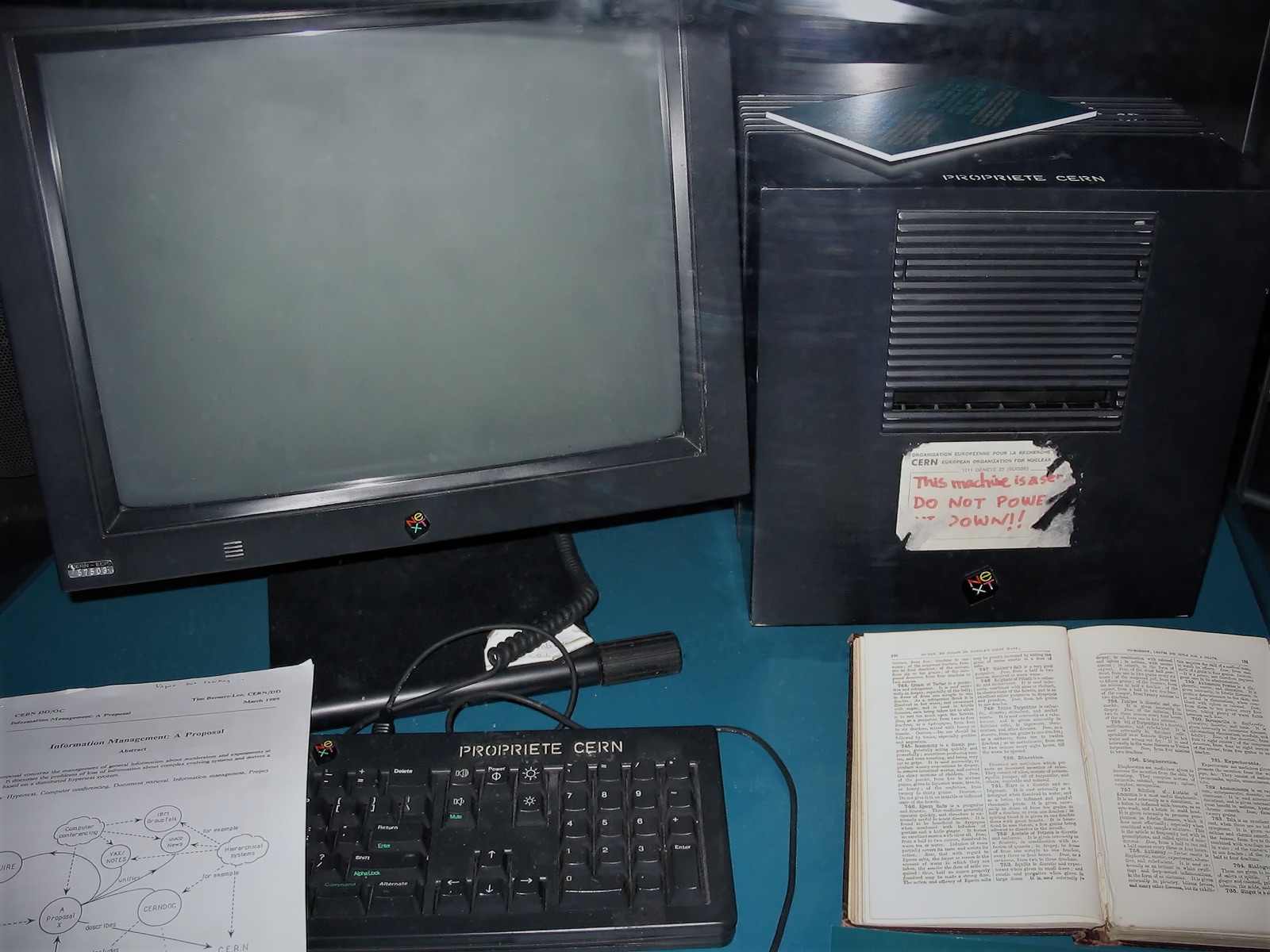
User:Coolcaesar at en.wikipedia, CC BY-SA 3.0, via Wikimedia Commons.
DNS
The Domain Name System (DNS) is the internet’s directory. It turns a domain name such as example.com into the IP address of the server that holds the site. A domain is read right to left: .com is the top-level domain, the label before it is the part someone registers, and anything further left, as in shop.example.com, is a subdomain the owner can create freely.4
The browser checks its own cache first. If the answer isn’t there, a resolver, usually run by the internet provider, asks a root server, which points to the server for .com, which points to the authoritative server for example.com, which returns the address.5 The 13 root server identities, A to M, are run by 12 organizations on hundreds of machines.6 Every answer is cached for a period the domain owner sets, its TTL (time to live).5
Those caches are why moving a site to a new host doesn’t take effect everywhere at once: stale copies last until they expire, usually a few hours.4 Nobody buys a domain outright. A registrar rents it for a year or more, so someone has to own the renewal.4
Domain names aren’t limited to Latin letters. On 5 May 2010 the first internationalized domain names for countries entered the root, all in Arabic script, for Egypt (مصر), Saudi Arabia and the United Arab Emirates.7 Underneath, each such label is stored in ASCII with the prefix xn--, which sometimes surfaces in analytics.8
HTTP and HTTPS
HTTP (Hypertext Transfer Protocol) is the protocol clients and servers use for the web: the client sends a request and the server sends back a response. Methods and status codes are covered elsewhere (→ 77 APIs). A page is many requests: the HTML, then each stylesheet, script, font and image it names, sometimes from other domains with their own DNS lookups. Every font file a design adds is another trip.
HTTPS is HTTP over a connection secured by TLS (Transport Layer Security). TLS encrypts data in transit, detects tampering, and lets the server prove its identity with a certificate from a certificate authority. SSL is its older predecessor, which is why people still say “SSL certificate”.9
HTTPS is no longer optional. In July 2018, Chrome 68 began labeling every plain-HTTP page “Not secure”; Google reported then that 76 percent of Chrome traffic on Android was already encrypted.10 Free certificates come from nonprofit authorities such as Let’s Encrypt,11 which checks only that the applicant controls the domain.12 The padlock means the connection is private, not that the site is honest, and trust badges shouldn’t suggest more.
URLs
A URL (uniform resource locator) is the address of one resource on the web. RFC 3986, written in 2005 by Berners-Lee, Roy Fielding and Larry Masinter, splits it into five parts.13 Take https://shop.example.com/en/shoes?size=42&sort=price#reviews:
| Part | In the example | What it does |
|---|---|---|
| Scheme | https | The protocol to use |
| Host | shop.example.com | The server, found through DNS |
| Path | /en/shoes | The resource on that server, often mirroring the site’s structure |
| Query string | size=42&sort=price | Parameters such as filters, sort order or search terms |
| Fragment | reviews | A place within the page; never sent to the server |
The port (443 for HTTPS) is usually left out.14
A URL is part of the interface. If a screen’s filters live in the query string, a shared link opens the same view; if they don’t, the recipient sees the default. A renamed path breaks every old link unless the server sends a redirect, so plan redirects when a site’s structure changes (→ 60 Navigation and findability; → 84 Marketing).
Hosting and CDNs
Hosting is renting a server, or space on one, that stays online and holds a site’s files. A static site is one whose server sends stored files as they are. A dynamic site adds an application server and a database that build pages on request (→ 76 Frontend, backend and architecture).15 Many portfolios and marketing sites never need more than static.
A content delivery network (CDN) is a group of servers in many places that keep copies of a site’s files and answer each request from one near the user. Distance adds latency: a visitor in Nairobi gets images faster from a nearby CDN server than from one server in Frankfurt.16 The server that holds the master copies is the origin.
CDNs and browsers both cache: they keep a copy of a file for a set time, given in the Cache-Control header, where max-age=604800 means one week.17 That’s why people still see an old logo after a new one goes live. Developers prevent it with cache busting: each new version of a file gets a new URL, such as logo.v2.svg.17 When you hand off a replacement asset, ask whether it gets a new file name or a cache purge.
See also
6 Contemporary design, 1970 to now · 60 Navigation and findability · 74 HTML and CSS · 75 JavaScript, browsers and performance · 76 Frontend, backend and architecture · 77 APIs
Sources
- Amazon Web Services (n.d.). “What is DNS?”
- Berners-Lee, T. (n.d.). “Frequently asked questions.” W3C.
- Berners-Lee, T., Fielding, R. and Masinter, L. (2005). RFC 3986, Uniform Resource Identifier (URI): Generic Syntax. IETF.
- CERN (n.d.). “A short history of the Web.”
- Google (2018). “A milestone for Chrome security: marking HTTP as ‘not secure’.” The Keyword.
- IANA (n.d.). “Root servers.”
- ICANN (2010). “First IDN ccTLDs available.”
- Klensin, J. (2010). RFC 5890, Internationalized Domain Names for Applications (IDNA): Definitions and Document Framework. IETF.
- Let’s Encrypt (n.d.). “About Let’s Encrypt” and “How it works.” Internet Security Research Group.
- MDN Web Docs (n.d.). “How the web works”; “What is a domain name?”; “What is a URL?”; “What is a web server?”; “Transport Layer Security (TLS)”; “CDN”; “HTTP caching.” Mozilla.
Notes
- MDN Web Docs (n.d.). “How the web works.” https://developer.mozilla.org/en-US/docs/Learn_web_development/Getting_started/Web_standards/How_the_web_works ↩ ↩
- CERN (n.d.). “A short history of the Web.” https://home.cern/science/computing/the-birth-of-the-web/short-history-web/ ↩ ↩
- Berners-Lee, T. (n.d.). “Frequently asked questions.” W3C. https://www.w3.org/People/Berners-Lee/FAQ.html ↩ ↩
- MDN Web Docs (n.d.). “What is a domain name?” https://developer.mozilla.org/en-US/docs/Learn_web_development/Howto/Web_mechanics/What_is_a_domain_name ↩ ↩ ↩
- Amazon Web Services (n.d.). “What is DNS?” https://aws.amazon.com/route53/what-is-dns/ ↩ ↩
- IANA (n.d.). “Root servers.” https://www.iana.org/domains/root/servers ↩
- ICANN (2010, May 5). “First IDN ccTLDs available.” https://www.icann.org/en/announcements/details/first-idn-cctlds-available-5-5-2010-en ↩
- Klensin, J. (2010). RFC 5890, Internationalized Domain Names for Applications (IDNA): Definitions and Document Framework, section 2.3.2.5. IETF. https://www.rfc-editor.org/rfc/rfc5890.html ↩
- MDN Web Docs (n.d.). “Transport Layer Security (TLS).” https://developer.mozilla.org/en-US/docs/Web/Security/Transport_Layer_Security ↩
- Google (2018, July 24). “A milestone for Chrome security: marking HTTP as ‘not secure’.” https://blog.google/products/chrome/milestone-chrome-security-marking-http-not-secure/ ↩
- Let’s Encrypt (n.d.). “About Let’s Encrypt.” Internet Security Research Group. https://letsencrypt.org/about/ ↩
- Let’s Encrypt (n.d.). “How it works.” https://letsencrypt.org/how-it-works/ ↩
- Berners-Lee, T., Fielding, R. and Masinter, L. (2005). RFC 3986, Uniform Resource Identifier (URI): Generic Syntax, section 3. IETF. https://www.rfc-editor.org/rfc/rfc3986.html ↩
- MDN Web Docs (n.d.). “What is a URL?” https://developer.mozilla.org/en-US/docs/Learn_web_development/Howto/Web_mechanics/What_is_a_URL ↩
- MDN Web Docs (n.d.). “What is a web server?” https://developer.mozilla.org/en-US/docs/Learn_web_development/Howto/Web_mechanics/What_is_a_web_server ↩
- MDN Web Docs (n.d.). “CDN.” Glossary. https://developer.mozilla.org/en-US/docs/Glossary/CDN ↩
- MDN Web Docs (n.d.). “HTTP caching.” https://developer.mozilla.org/en-US/docs/Web/HTTP/Guides/Caching ↩ ↩