Chapter 38: Prepress and printing
Prepress is the work between a finished design and a running press: checking files, converting color, adding bleed, imposing pages, and making proofs and plates. Most printing problems start here rather than on the press. A missing font or an RGB image costs nothing to fix on screen and a great deal to fix in a run of 20,000.
Print-ready files
A print-ready file is one the printer can image without changing it. In practice that means a PDF, usually exported to one of the PDF/X standards (ISO 15930), which strip out anything a press can’t use: fonts and images must be embedded, the trim must be defined, and encryption is banned.1 PDF/X-1a and PDF/X-4 are the versions printers ask for most. Images should be about 300 ppi at their final printed size (→ 35 Resolution, formats and units), and color should be CMYK or the agreed spot inks (→ 15 Color in screen and print).2 Some printers also want packaging files: the layout file with its fonts and linked images collected into one folder, which InDesign does with File > Package.3 Ask for the printer’s specification before you start the layout.
Bleed, trim and safe area
Trim size is the finished size of the piece after cutting: 210 × 297 mm for A4, 8.5 × 11 in for US Letter. The trim is the cut itself. Printers print on a larger sheet and guillotine it down, and the guillotine is never exact, because sheets shift in the stack. Bleed is image area carried past the trim so that a small cutting error shows a little more picture instead of a white sliver.4 The usual figure is 3 mm (0.125 in), so an A4 page with bleed is a 216 × 303 mm file and a US Letter page is 8.75 × 11.25 in.45 Some printers ask for more.
The safe area works the other way, inside the trim. Text, logos and anything that would look wrong if cut belong inside it, and printers ask for 3–5 mm (0.125–0.25 in).42 Avoid thin borders near the trim too: a cut 1 mm off makes them lopsided.
Crop marks are short lines outside the bleed that show where to cut.4 Layout programs add them at export, offset from the trim so they don’t print into the bleed. The slug is a further margin outside the bleed for job information (file name, date, inks), trimmed away with the crop marks.
Overprint, trapping and preflight
By default, a layout program knocks out whatever sits underneath an object: where yellow text sits on a cyan box, the cyan plate has a text-shaped hole in it. Overprint is the opposite setting. The top ink prints on top of the one beneath and the two mix, so 100% cyan overprinting 100% yellow prints green.6 InDesign overprints 100% black by default, so that small black type over a color can’t show a gap if the plates shift.7
Overprint is also how elements vanish. White is no ink at all, so a white object set to overprint prints nothing. In 2001 Sandee Cohen described a client logo whose white shapes vanished from the printed job this way, and the fault still turns up.6 Check with Overprint Preview, or Output Preview in Acrobat, before you send the file.
Rich black is black with cyan, magenta and yellow added beneath it, because 100% K alone prints as a dark gray over large areas. One common recipe is C60 M40 Y40 K100.8 Use it for large solids and big headings. Keep small type in 100% K, because four plates slightly out of line give small type colored fringes; Wayne Collins suggests about 18 pt as the size above which black type can be built as rich black.9 Rich black isn’t the Registration swatch, which prints every ink at 100% and is meant only for marks.7
Total area coverage (TAC) is the sum of the ink percentages at any point, so that recipe is 240%. Above the limit for the press and paper, ink won’t dry and marks the next sheet.9 The ICC’s registered offset profiles set limits between 260% and 350%, for example 300% for coated paper to FOGRA51 and 320% for GRACoL 2013.10
Registration is the alignment of the separate color plates. Trapping hides small registration errors with a thin overlap where two colors meet: about 0.003 in (0.08 mm) on sheet-fed offset, and up to 1 pt on some flexographic presses.9 It is usually the printer’s job, so leave it alone unless asked.9
Preflight is the check of a file against the printer’s requirements before it goes out: fonts, image resolution, color, spot inks, thin lines and black overprint.11 InDesign’s Preflight panel checks continuously as you work.12
Proofs
A proof is a sample of the job, made before the run, for checking and approval. A soft proof simulates the result on a calibrated monitor: quick, free, and good for catching errors, but not a color agreement. A hard proof is printed, usually on a high-end inkjet. A contract proof is a hard proof made to ISO 12647-7, with a measured control strip showing that it matches the agreed printing condition, and it becomes the reference if printer and client later disagree.13 A press check is a visit to approve the first sheets as the run starts, for color and ink coverage; layout and text should have been settled at the proof stage.14 Signing a proof approves what it shows, so read it as carefully as the file.
Offset and digital printing
Offset lithography is printing from a flat plate on which the image areas take a greasy ink while the wet non-image areas reject it.15 Each color has its own aluminum plate. On the press, rollers dampen the plate, then ink it, and the inked image transfers to a rubber-covered cylinder, the blanket, and from the blanket to the paper.1516 The plate never touches the paper, and the soft blanket lets offset print cleanly on textured stock. Ira Washington Rubel, a paper-mill owner in Nutley, New Jersey, built one of the first rotary offset presses for paper; the Smithsonian, which holds it, dates it to 1903.17
Offset’s costs follow from its plates. Before a run, plates are made and mounted and the press brought up to color, a stage called makeready that takes minutes to tens of minutes and spoils sheets as it goes.16 After that, each extra copy is cheap. Offset can run any mixed ink as a spot color on an extra unit, and printers work to standard printing conditions under ISO 12647-2, whose characterization data (FOGRA in Europe, GRACoL in the US) underlie the profiles you convert to.10
A digital press images each sheet directly from the file with toner or inkjet, and no plates.9 Because every sheet is imaged afresh, every sheet can differ. Variable data printing uses this to print personalized names, addresses or codes from a data file, which no plate-based process can do.18 Setup is close to nothing, but the fiftieth copy costs about the same as the five-thousandth.
So run length, the number of copies, decides most jobs: offset for long runs, digital for short ones and anything personalized.16 The crossover depends on the press, paper and number of colors, so for a run in the low thousands, ask for both quotes.
| Offset | Digital | |
|---|---|---|
| Setup cost | High: plates and makeready | Low |
| Cost per copy | Falls as quantity rises | Roughly flat |
| Color | Process plus any mixed spot ink, to ISO 12647-2 conditions | Usually process colors only |
| Suits | Long runs | Short runs, down to one copy |
| Variable data | No | Yes |
Screen printing, letterpress and Risograph
These three are chosen more often for their look, or for what they can print on, than for price.
Screen printing pushes ink through a fine mesh stretched on a frame. A stencil blocks the areas that shouldn’t print, a rubber squeegee draws the ink across, and each color needs its own screen.19 It developed around 1900 for advertising and display work.19 Because almost any ink can go through a screen, it prints on textiles, glass, metal, wood and plastic, and circuit boards.20
Letterpress is relief printing: the inked image stands up from the type or plate and is pressed into the paper. It was the main printing method from Gutenberg, about 1450, until lithography and then offset displaced it. It now prints from photopolymer plates made from digital files as well as from metal type.21 The deep impression, or bite, that sells letterpress wedding invitations today is a recent taste. For most of its history printers tried to leave no dent at all.22
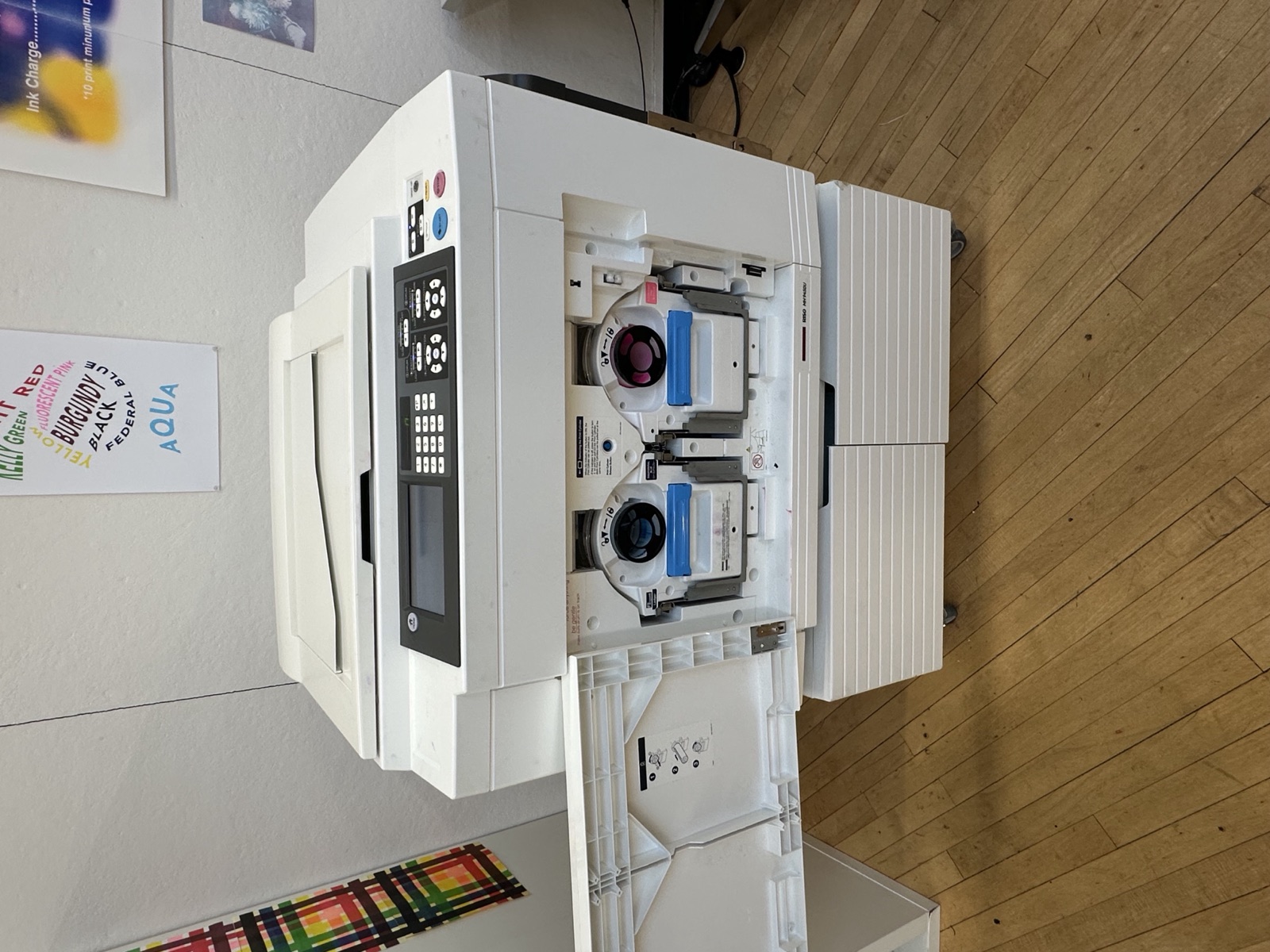
The Risograph is a stencil duplicator from the Japanese company Riso Kagaku, which launched its first Risograph machines in 1980.23 The machine burns the image into a thin stencil, wraps it around an ink drum, and squeezes ink through it onto the paper, one color per drum and one pass per color.24 The colors rarely line up perfectly.25 That slight misregistration, with flat, bright spot colors and a low cost per copy, is why zine makers and small poster presses adopted Riso.
Tapiruss, CC BY-SA 4.0, via Wikimedia Commons.
Flexography and gravure
Flexography prints from flexible rubber or polymer relief plates with fluid, fast-drying inks.26 It prints on films, labels, foil and corrugated board, and it needs heavy trapping because the material stretches as it moves through the press (→ 40 Packaging design).269 Gravure works the opposite way: the image is etched as tiny cells into a copper cylinder, a blade wipes the surface clean, and the paper takes ink from the cells.27 The cylinders take careful preparation but are chromium-plated to last, so gravure suits very long runs of magazines, catalogs and newspaper supplements.27
See also
15 Color in screen and print · 25 Editorial and book design · 29 Logo design · 35 Resolution, formats and units · 39 Paper and finishing · 40 Packaging design
Sources
- Adobe (2026). “About overprinting” and “Configure and use the preflight panel.” InDesign User Guide.
- Adobe (n.d.). “Share your documents with others using the Package command.”
- Central Michigan University Printing Services (n.d.). “Printing services helpful hints.”
- Cleary, N. (2024). “How screen printing is used in a wide range of industrial applications.” FESPA.
- Cohen, S. (2001). “The Digital Dish: The Mystery of the Vanishing Whites.” CreativePro.
- Collins, W., and Medeiros, R. (2015). Chapters 5 and 6 in Graphic Communications Open Textbook Collective, Graphic Design and Print Production Fundamentals. BCcampus.
- Encyclopaedia Britannica (n.d.). “Offset printing,” “Letterpress printing,” “Silkscreen,” “Flexography,” “Gravure printing.”
- Fogra (n.d.). “Contract Proof Creation.”
- Hanson, E. (n.d.). “How a Printing Press Works.” Society for Imaging Science and Technology.
- International Color Consortium (n.d.). ICC Profile Registry.
- Library of Congress (n.d.). “PDF/X, PDF for Prepress Exchange.” Sustainability of Digital Formats.
- Maryland Institute College of Art (n.d.). “The What and How of Risograph Printing.”
- PPPPress, MIT (n.d.). “How it works.”
- RISO (n.d.). Company history.
- Smithsonian National Museum of American History (n.d.). “Lithographic offset press, Rubel.”
- University of Bristol Print Services (n.d.). “Crops and bleed.”
- University of Minnesota Printing Services (n.d.). “What is bleed?”
- Utah Valley University Printing Services (n.d.). “How to Set Up Print Files Correctly.”
- Washington State Department of Enterprise Services (n.d.). “How to perform a press check.”
- Zhuang, J. (2016). “Is the Fight to Revive Traditional Letterpress a Losing Battle?” AIGA Eye on Design.
Notes
- Library of Congress (n.d.). “PDF/X, PDF for Prepress Exchange.” Sustainability of Digital Formats. https://www.loc.gov/preservation/digital/formats/fdd/fdd000124.shtml ↩
- Utah Valley University Printing Services (n.d.). “How to Set Up Print Files Correctly: Bleeds, Resolution, and Color Space.” https://www.uvu.edu/printingservices/recources/set_up_print_files.html ↩ ↩
- Adobe (n.d.). “Share your documents with others using the Package command.” https://www.adobe.com/learn/indesign/web/save-share-projects ↩
- University of Bristol Print Services (n.d.). “Crops and bleed.” https://www.bristol.ac.uk/print-services/useful-information/crops-and-bleed/ ↩ ↩ ↩ ↩
- University of Minnesota Printing Services (n.d.). “What is bleed?” https://printing.umn.edu/tools/what-is-bleed.html ↩
- Cohen, S. (2001). “The Digital Dish: The Mystery of the Vanishing Whites.” CreativePro, 10 July 2001. https://creativepro.com/the-digital-dish-the-mystery-of-the-vanishing-whites/ ↩ ↩
- Adobe (2026). “About overprinting.” InDesign User Guide. https://helpx.adobe.com/indesign/desktop/print/color-output-and-separations/about-overprinting.html ↩ ↩
- Central Michigan University Printing Services (n.d.). “Printing services helpful hints.” https://www.cmich.edu/offices-departments/finance-administrative-services/auxiliary-services/printing-services/printing-services-helpful-hints ↩
- Collins, W. (2015). “5.4 Trapping.” In Graphic Design and Print Production Fundamentals. BCcampus, CC BY 4.0. https://opentextbc.ca/graphicdesign/chapter/5-4-trapping/ ↩ ↩ ↩ ↩ ↩ ↩
- International Color Consortium (n.d.). “ICC Profile Registry.” https://registry.color.org/profile-registry/ ↩ ↩
- Collins, W. (2015). “5.7 Preflight.” In Graphic Design and Print Production Fundamentals. BCcampus. https://opentextbc.ca/graphicdesign/chapter/5-7-preflight/ ↩
- Adobe (2026). “Configure and use the preflight panel.” InDesign User Guide. https://helpx.adobe.com/indesign/desktop/print/preflight/configure-and-use-the-preflight-panel.html ↩
- Fogra (n.d.). “Contract Proof Creation.” https://fogra.org/en/certification/prepress-technology/contract-proof-creation ↩
- Washington State Department of Enterprise Services (n.d.). “How to perform a press check.” https://des.wa.gov/services/print-mail/resource-center/how-perform-press-check ↩
- Encyclopaedia Britannica (n.d.). “Offset printing.” https://www.britannica.com/technology/offset-printing ↩ ↩
- Hanson, E. (n.d.). “How a Printing Press Works.” Society for Imaging Science and Technology. https://www.imaging.org/IST/IST/Resources/Tutorials/Printing_Press.aspx ↩ ↩ ↩
- Smithsonian National Museum of American History (n.d.). “Lithographic offset press, Rubel.” GA.23002. https://www.si.edu/object/nmah_882246 ↩
- Medeiros, R. (2015). “6.7 Variable Data Printing.” In Graphic Design and Print Production Fundamentals. BCcampus. https://opentextbc.ca/graphicdesign/chapter/6-7-variable-data-printing/ ↩
- Encyclopaedia Britannica (2026). “Silkscreen.” https://www.britannica.com/technology/silkscreen ↩ ↩
- Cleary, N. (2024). “How screen printing is used in a wide range of industrial applications.” FESPA, 27 September 2024. https://www.fespa.com/en/news-media/how-screen-printing-is-used-in-a-wide-range-of-industrial-applications/ ↩
- Encyclopaedia Britannica (n.d.). “Letterpress printing.” https://www.britannica.com/technology/letterpress-printing ↩
- Zhuang, J. (2016). “Is the Fight to Revive Traditional Letterpress a Losing Battle?” AIGA Eye on Design, 11 July 2016. https://eyeondesign.aiga.org/is-the-fight-to-revive-traditional-letterpress-a-losing-battle/ ↩
- RISO (n.d.). “RISO: a Japanese print success story.” Company history. https://www.risoprinter.de/en/company/history ↩
- PPPPress, MIT (n.d.). “How it works.” https://sites.mit.edu/ppppress/how-it-works ↩
- Maryland Institute College of Art (n.d.). “The What and How of Risograph Printing.” https://www.mica.edu/campus-life-and-resources/places-and-spaces/maker-spaces-fabrication-studios/printmaking-studio/risograph-file-prep/ ↩
- Encyclopaedia Britannica (n.d.). “Flexography.” https://www.britannica.com/technology/flexography ↩ ↩
- Encyclopaedia Britannica (n.d.). “Gravure printing.” https://www.britannica.com/technology/gravure-printing ↩ ↩