Chapter 34: Image editing
Image editing is the work done to a photograph after it’s taken: fixing its exposure and color, removing what shouldn’t be there, combining several pictures into one and giving a set of images a common look. Software makes almost any change possible and most of them invisible, so the hard questions are about what an edit claims as much as how to make it.
Non-destructive editing
Non-destructive editing is editing that leaves the original pixels untouched, so every change can be adjusted or removed later. Destructive editing writes changes into the image itself. Brighten a JPEG, save it, and the darker original is gone; save it again and the lossy compression throws away a little more detail (→ 35 Resolution, formats and units).
Raw processors such as Lightroom, Capture One and the open-source darktable never change the camera file. They store edits as instructions and apply them only to the preview and to exported copies. darktable keeps its edit history in a sidecar file, a small XMP file saved next to the raw.1
Layer-based editors stack changes above the image instead. An adjustment layer applies a correction such as curves or hue and saturation to the layers beneath without changing their pixels, and a layer mask (→ 12 Digital drawing and illustration tools) limits where it applies. A smart object, in Photoshop’s terms, wraps a layer so that scaling and filters can be redone from the original data. GIMP made filters re-editable by default only in version 3.0, released in March 2025. Before that, applying a filter merged it into the layer.2
The cost is size: a layered master can be many times larger than its flattened export.
In practice
- Keep the raw or original file and never save over it.
- Put corrections on adjustment layers and retouching on its own layer above the original.
- Name layers. Forty layers called “Layer 23 copy” are non-destructive in theory only.
Retouching and compositing
Retouching is the alteration of parts of a photograph: removing dust and blemishes, smoothing skin, taking out a stray cable. Compositing is building one image from parts of several, such as a product dropped onto a separately shot background.
Most retouching moves pixels from one place to another. A clone tool copies them exactly. A healing tool copies texture from a source but blends it with the color and brightness around the destination.3 Dodging and burning, lightening and darkening areas by hand, takes its names from the darkroom, where a printer held back or added light under the enlarger.
Compositing is older than digital photography. In 1857 Oscar Rejlander printed The Two Ways of Life from more than thirty negatives.4 The next year Henry Peach Robinson made Fading Away, a combination print from five, and it was controversial both for its subject, a dying girl, and for its method.5 In 1860 Robinson showed the Photographic Society of Scotland a print with the joins “purposely widened” so the audience could see how it was assembled, and explained that he planned the divisions to fall in unimportant places.6
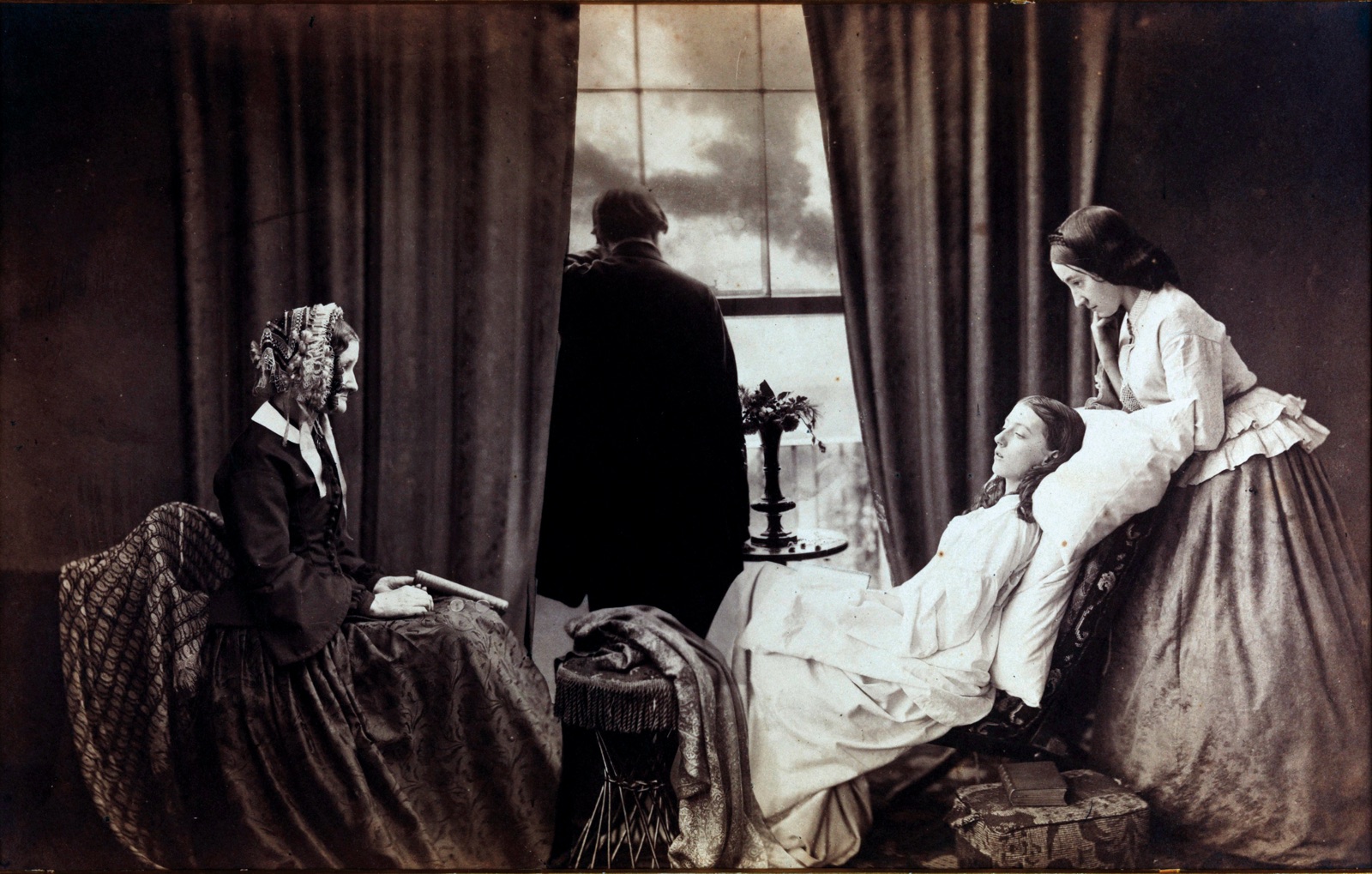
Henry Peach Robinson, public domain, via Wikimedia Commons.
A composite convinces when its parts agree: light from the same direction and of the same hardness, matching perspective, and consistent grain and sharpness across every join.
Color correction and color grading
Color correction is the technical work of making images accurate and consistent: setting white balance so neutral grays have no color cast, fixing exposure and contrast, and matching shots so a face looks the same in every frame of a scene. Color grading is the creative work that follows: giving the corrected images a look to set a mood. Correction comes first, because a look laid over uncorrected footage lands differently on every shot.7 People often use the words interchangeably, so ask which one a client means.
Both use the same controls. A primary correction affects the whole image, usually through separate controls for dark, middle and light tones. A secondary correction is limited to a range of hues or a masked area, such as the sky alone.
For O Brother, Where Art Thou? (2000), the cinematographer Roger Deakins wanted Mississippi’s summer greens to look like old hand-tinted postcards. Chemical tests couldn’t change one color without the others, so the negative was scanned at Cinesite and graded digitally, the greens pushed toward yellow and brown, over about ten weeks.8
A grade travels only as far as the color management behind it. A look set on an uncalibrated monitor will look different on everyone else’s (→ 15 Color in screen and print).
The ethics of retouching
The ethics of retouching is the question of which edits leave an image honest for the use it’s put to. An advertisement, a fashion spread, a news photograph and an artwork each promise something different, so an edit that’s routine in one gets people fired in another.
News draws the strictest line. The US National Press Photographers Association’s code says editing “should maintain the integrity” of an image’s content and context, and forbids manipulating images in any way that can mislead viewers.9 In August 2006 Reuters withdrew a photograph of smoke over Beirut by the Lebanese freelancer Adnan Hajj after it emerged that the smoke had been enlarged and darkened in Photoshop. After finding a second altered picture, the agency ended its relationship with him and removed all 920 of his photographs from its archive.10 Carelessness counts too: in 2015 World Press Photo disqualified up to 20% of the entries in its penultimate round for removing details or excessive toning, though its managing director said the jury saw no attempt to deceive.11
Advertising law concentrates on bodies. Since October 1, 2017, France has required commercial photographs of models made thinner or thicker by software to carry the words “photographie retouchée”.12 Norway’s rule, in force since July 1, 2022, is wider: paid advertising, including influencers’ posts, must carry a standard label if retouching or a filter has changed a person’s body shape, size or skin. Removing a single pimple counts.13
Content Credentials, defined by the C2PA, attach a record of where a file came from and how it was edited.14 They don’t judge an edit; they let the viewer see it.
In practice
- Ask what the image will be used for before deciding what to edit.
- In news and documentary work, tone and crop; don’t add or remove anything.
- Keep the originals. Norway’s regulator expects the advertiser to prove an image wasn’t retouched.13
See also
- 12 Digital drawing and illustration tools
- 15 Color in screen and print
- 33 Photography
- 35 Resolution, formats and units
- 36 Motion, video and sound
- 96 Ethical design
Sources
- Berry, S. “Color correction vs. color grading: know the difference.” Videomaker.
- C2PA (Coalition for Content Provenance and Authenticity). Home page and “About.”
- CMS Francis Lefebvre (2017). “La mention « photographie retouchée » obligatoire à partir du 1er octobre 2017.”
- darktable user manual. “Sidecar files.”
- Forbrukertilsynet (Norwegian Consumer Authority). “The Norwegian Consumer Authority’s guideline on labelling retouched advertising.”
- GIMP (2025). “GIMP 3.0 released” and GIMP 3.0 release notes.
- GIMP documentation. “Heal tool.” GIMP 2.10 user manual.
- American Cinematographer (2000). “Escaping from chains: O Brother, Where Art Thou?” October.
- Ming, Y., and Laurent, O. (2015). “World Press Photo disqualifies 20% of finalists for manipulation.” TIME, February 12.
- National Press Photographers Association. “Code of Ethics for Visual Journalists.”
- NBC News / Associated Press (2006). “Altered images prompt photographer’s firing.” August 7.
- Princeton University Art Museum. Collection records for Robinson, Fading Away (15529), and Rejlander, Two Ways of Life (x1993-22).
- Robinson, H. P. (1860). “On printing photographic pictures from several negatives.” The British Journal of Photography, April 2, p. 94.
Notes
- darktable user manual, “Sidecar files.” https://docs.darktable.org/usermanual/development/en/overview/sidecar-files/sidecar/ ↩
- GIMP 3.0 release notes, “Non-destructive filters.” https://www.gimp.org/release-notes/gimp-3.0.html; release date from https://www.gimp.org/news/2025/03/16/gimp-3-0-released/ ↩
- GIMP documentation, “Heal tool.” https://docs.gimp.org/2.10/en/gimp-tool-heal.html ↩
- Princeton University Art Museum, Rejlander, Two Ways of Life, x1993-22. https://artmuseum.princeton.edu/collections/objects/18132 ↩
- Princeton University Art Museum, Robinson, Fading Away. https://artmuseum.princeton.edu/collections/objects/15529 ↩
- Robinson (1860), British Journal of Photography, p. 94. https://cool.culturalheritage.org/albumen/library/c19/robinson.html ↩
- Berry, Videomaker. https://www.videomaker.com/how-to/editing/color-correction/color-correction-vs-color-grading-know-the-difference/ ↩
- American Cinematographer (October 2000). https://theasc.com/article/o-brother-cinematography-deakins ↩
- NPPA, Code of Ethics, standard 6. https://nppa.org/resources/code-ethics ↩
- NBC News / AP (2006). https://www.nbcnews.com/id/wbna13165165 ↩
- Ming and Laurent (2015), TIME. https://time.com/3706626/world-press-photo-processing-manipulation-disqualified ↩
- CMS Francis Lefebvre (2017), on decree no. 2017-738 of May 4, 2017. https://cms.law/fr/fra/legal-updates/la-mention-photographie-retouchee-obligatoire-a-partir-du-1er-octobre-2017 ↩
- Forbrukertilsynet, guideline on labelling retouched advertising. https://www.forbrukertilsynet.no/english/the-norwegian-consumer-authoritys-guideline-on-labelling-retouched-advertising ↩ ↩
- C2PA. https://c2pa.org/ ↩