Chapter 53: Usability testing
Usability testing is watching representative people try to do real tasks with a design, in order to find where it fails them. It measures behavior, not opinion: a participant who says the checkout is “fine” after taking four minutes to find the delivery date has told you two different things, and the four minutes is the one to trust. A test can run on anything from a paper sketch (→ 62 Wireframes, mockups and prototypes) to a shipped product.
Moderated and unmoderated testing
A moderated test is one in which a facilitator watches the session live and can talk with the participant, in the same room or over a video call.1 The facilitator gives the tasks, keeps the participant talking and asks follow-up questions when something interesting happens: “You paused there. What were you expecting?” Observers and a note-taker usually watch from elsewhere. The UK Government Digital Service suggests sessions of 30 to 60 minutes and no more than six one-hour sessions a day, with at least 15 minutes between them.2
An unmoderated test is one the participant completes alone, on their own schedule, while software records the screen and voice.1 Many people can take part at once, so a round finishes quickly. The cost is that nobody can ask about something unexpected. Follow-up questions are written in advance and every participant gets the same ones. Without someone to prompt them, participants also tend to think aloud less.1
| Moderated | Unmoderated | |
|---|---|---|
| Facilitator | Present, live | None; session recorded |
| Follow-up questions | Asked as things happen | Written in advance, identical for all |
| Speed of a round | Slower; sessions are booked one at a time | Faster; participants run in parallel |
| Best for | New designs, complex tasks, finding out why | Narrow questions about a few specific elements |
Use moderated sessions when you don’t yet know what the problems are. Use unmoderated ones when you do, and need to check a fix or a small change across more people.
Think-aloud protocol
The think-aloud protocol is a method in which participants say what they’re thinking while they use the design: what they’re looking for, what they expect, what they’ve just read. It comes from cognitive psychology, where the standard account of verbal reports is K. Anders Ericsson and Herbert Simon’s work of 1984.3 Clayton Lewis adapted it for interface design in a 1982 IBM research report.4 In Usability Engineering (1993), Jakob Nielsen called thinking aloud possibly the most valuable single usability method, and he still ranked it first in 2012.5
Its value is that it shows why people fail, not only where. Lewis and Rieman give the example of users of a law-office system who read “parameter” as “perimeter”.4 Prompts should keep people talking without steering them: “Tell me what you’re thinking” or “Keep talking”. Avoid “Why did you do that?”, because, as Lewis and Rieman warn, “people will make up an answer to any question you ask.”4
In practice facilitators prompt more than the psychological theory allows, a gap Ted Boren and Judith Ramey documented in 2000.3 Thinking aloud is also unnatural, and some participants filter what they say until they’ve worked it out.5
Concurrent think-aloud happens during the task. Retrospective think-aloud happens afterward, usually while the participant watches a recording of their session. A 2003 study of a library catalogue found that the two methods found similar sets of problems, but that talking during the task made participants perform worse.6 Don’t treat task times from a think-aloud session as real-world speed.
Culture changes the method too. Torkil Clemmensen and colleagues reviewed cross-cultural studies in 2009 and concluded that thinking aloud affects task performance differently for Eastern and Western participants, and that differences in nonverbal behavior affect which problems an evaluator notices.7 If the facilitator and participant come from different backgrounds, expect to miss things, and match tasks to the participant’s context.
Task design
A task is what a participant is asked to do. A task scenario is a task written with enough context that the participant acts as they would in their own life. Nielsen Norman Group’s guidance asks for three things: make it realistic, make it actionable (ask people to do it, not to describe how they would), and give no clues, such as the label of the menu item they need.8
Compare two versions for a clinic booking site:
- Weak: “Click Appointments and book a check-up with Dr. Patel.” This names the menu and tells the participant how to start.
- Better: “You’ve had a toothache for two days. Book the earliest appointment you can get with Dr. Patel next week.” This gives a reason, a constraint and the details the participant needs, but no route.
Vague tasks fail as badly as leading ones. “Explore the site” gives nothing to succeed or fail at. Write each task from a research question (→ 50 Planning design research), decide in advance what counts as success, and run a pilot test, a trial session with a colleague, to catch wording that confuses or gives the answer away.
Remote and guerrilla testing
Remote testing is usability testing in which participant and researcher are in different places. It can be moderated, over a video call with screen sharing, or unmoderated. It reaches people far from the office and lets them use their own equipment. That matters most for people who use assistive technology, whose setup is hard to reproduce in a lab; the GOV.UK Service Manual suggests letting them use their own devices, and visiting them at home or work if needed.2
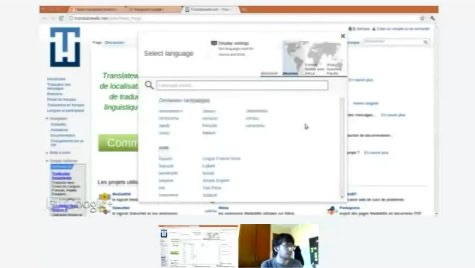
Pau Giner, CC BY-SA 3.0, via Wikimedia Commons.
Guerrilla testing is short, informal testing with people approached in public places such as cafés, libraries and stations. In 2015 a content team at the UK Driver and Vehicle Standards Agency took two versions of a letter to a car park in Nottingham, where vehicle owners were easy to find. In just under two hours they filmed eight people reading both versions, with signed consent, and thanked each with a cupcake.9
Both methods descend from what Nielsen called discount usability in 1989: small tests with a handful of users, simple paper prototypes and heuristic evaluation (→ 47 Laws and heuristics), in place of costly formal studies.10 Nielsen’s argument was that a rough test still finds real problems and no test finds none. The limit is who you meet. The people in a café may not be your users, so guerrilla testing suits everyday tasks better than specialist ones. Consent still applies (→ 50 Planning design research).
Reporting findings
A finding is one observed usability problem, written up with its evidence, its severity and a recommendation. A useful finding says what happened, how many participants it happened to, and what the team saw or heard: a quote, a clip, a timestamp. “Users found the form confusing” isn’t a finding. “Four of five participants entered their phone number in the postcode field, because the two fields share a row and the label sits above only one” is.
A severity rating ranks problems so the team fixes the worst first. Nielsen’s 1994 scale runs from 0 to 4:11
| Rating | Meaning |
|---|---|
| 0 | Not a usability problem |
| 1 | Cosmetic; fix if time allows |
| 2 | Minor; low priority |
| 3 | Major; high priority |
| 4 | Catastrophe; fix before release |
He bases severity on three factors: how often the problem occurs, how hard it is to overcome, and whether it bothers users once or repeatedly.
Findings depend on who’s watching. In a review of eleven studies, Morten Hertzum and Niels Ebbe Jacobsen found that two evaluators applying the same method to the same system agreed on, on average, between 5% and 65% of the problems they reported.12 They called this the evaluator effect. Have at least two people watch and analyze every round, and compare notes before rating anything (→ 54 Synthesis and insight).
Keep the report short and lead with the worst problems. Better still, get the team to watch: Nielsen notes that watching sessions tends to persuade skeptical developers, designers and executives.5 Formal reports exist too. The Common Industry Format, published as ISO/IEC 25062:2006, sets out a structure for reporting summative tests: the product, participants, tasks, measures and results.13
See also
3 Design processes · 47 Laws and heuristics · 48 Usability and ergonomics · 50 Planning design research · 51 Qualitative and quantitative research · 54 Synthesis and insight
Sources
- Boren, T. and Ramey, J. (2000). “Thinking aloud: reconciling theory and practice.” IEEE Transactions on Professional Communication 43(3).
- Clemmensen, T., Hertzum, M., Hornbæk, K., Shi, Q. and Yammiyavar, P. (2009). “Cultural cognition in usability evaluation.” Interacting with Computers 21(3).
- Government Digital Service (2017). “Using moderated usability testing.” GOV.UK Service Manual.
- Hertzum, M. and Jacobsen, N. E. (2003). “The evaluator effect: a chilling fact about usability evaluation methods.” International Journal of Human-Computer Interaction 15(1).
- Lewis, C. and Rieman, J. (1993). Task-Centered User Interface Design: A Practical Introduction.
- McCloskey, M. (2014). “Turn User Goals into Task Scenarios for Usability Testing.” Nielsen Norman Group.
- National Institute of Standards and Technology (n.d.). “Usability Standards.”
- Nielsen, J. (1994). “Severity Ratings for Usability Problems.” Nielsen Norman Group.
- Nielsen, J. (2009). “Discount Usability: 20 Years.” Nielsen Norman Group.
- Nielsen, J. (2012). “Thinking Aloud: The #1 Usability Tool.” Nielsen Norman Group.
- Ploughman, J. (2015). “Guerrilla testing content: it makes it better.” Inside GOV.UK blog.
- Schade, A. (2013). “Remote Usability Tests: Moderated and Unmoderated.” Nielsen Norman Group.
- van den Haak, M. J., de Jong, M. D. T. and Schellens, P. J. (2003). “Retrospective vs. concurrent think-aloud protocols.” Behaviour and Information Technology 22(5).
Notes
- Schade, A. (2013, October 12). “Remote Usability Tests: Moderated and Unmoderated.” Nielsen Norman Group. https://www.nngroup.com/articles/remote-usability-tests/ ↩ ↩ ↩
- Government Digital Service (2017). “Using moderated usability testing.” GOV.UK Service Manual, last updated 3 October 2017. https://www.gov.uk/service-manual/user-research/using-moderated-usability-testing ↩ ↩
- Boren, T. and Ramey, J. (2000). “Thinking aloud: reconciling theory and practice.” IEEE Transactions on Professional Communication 43(3), 261–278. https://doi.org/10.1109/47.867942 ↩ ↩
- Lewis, C. and Rieman, J. (1993). Task-Centered User Interface Design: A Practical Introduction, section 5.5, adapted from Lewis, C. (1982), IBM Research Report RC 9265. https://hcibib.org/tcuid/chap-5.html ↩ ↩ ↩
- Nielsen, J. (2012, January 15). “Thinking Aloud: The #1 Usability Tool.” Nielsen Norman Group. https://www.nngroup.com/articles/thinking-aloud-the-1-usability-tool/ ↩ ↩ ↩
- van den Haak, M. J., de Jong, M. D. T. and Schellens, P. J. (2003). “Retrospective vs. concurrent think-aloud protocols: testing the usability of an online library catalogue.” Behaviour and Information Technology 22(5), 339–351. https://research.vu.nl/en/publications/retrospective-vs-concurrent-think-aloud-protocols-testing-the-usa-2/ ↩
- Clemmensen, T., Hertzum, M., Hornbæk, K., Shi, Q. and Yammiyavar, P. (2009). “Cultural cognition in usability evaluation.” Interacting with Computers 21(3), 212–220. https://researchprofiles.ku.dk/en/publications/cultural-cognition-in-usability-evaluation/ ↩
- McCloskey, M. (2014, January 12). “Turn User Goals into Task Scenarios for Usability Testing.” Nielsen Norman Group. https://www.nngroup.com/articles/task-scenarios-usability-testing/ ↩
- Ploughman, J. (2015, November 16). “Guerrilla testing content: it makes it better.” Inside GOV.UK blog. https://insidegovuk.blog.gov.uk/2015/11/16/guerrilla-testing-content-it-makes-it-better/ ↩
- Nielsen, J. (2009, September 13). “Discount Usability: 20 Years.” Nielsen Norman Group. https://www.nngroup.com/articles/discount-usability-20-years/ ↩
- Nielsen, J. (1994, November 1). “Severity Ratings for Usability Problems.” Nielsen Norman Group. https://www.nngroup.com/articles/how-to-rate-the-severity-of-usability-problems/ ↩
- Hertzum, M. and Jacobsen, N. E. (2003). “The evaluator effect: a chilling fact about usability evaluation methods.” International Journal of Human-Computer Interaction 15(1), 183–204. First published 2001. https://forskning.ruc.dk/da/publications/the-evaluator-effect-a-chilling-fact-about-usability-evaluation-m/ ↩
- National Institute of Standards and Technology (n.d.). “Usability Standards.” https://www.nist.gov/programs-projects/usability-standards ↩ ↩